MagicSword Portal - Feature Release Summary
This major MagicSword release brings upgrades focused on visibility, detection, and control. From a real-time Alert Center to AI-powered risk scoring, multi-channel notifications, and a streamlined policy wizard. Everything is built to make your security operations faster and clearer.
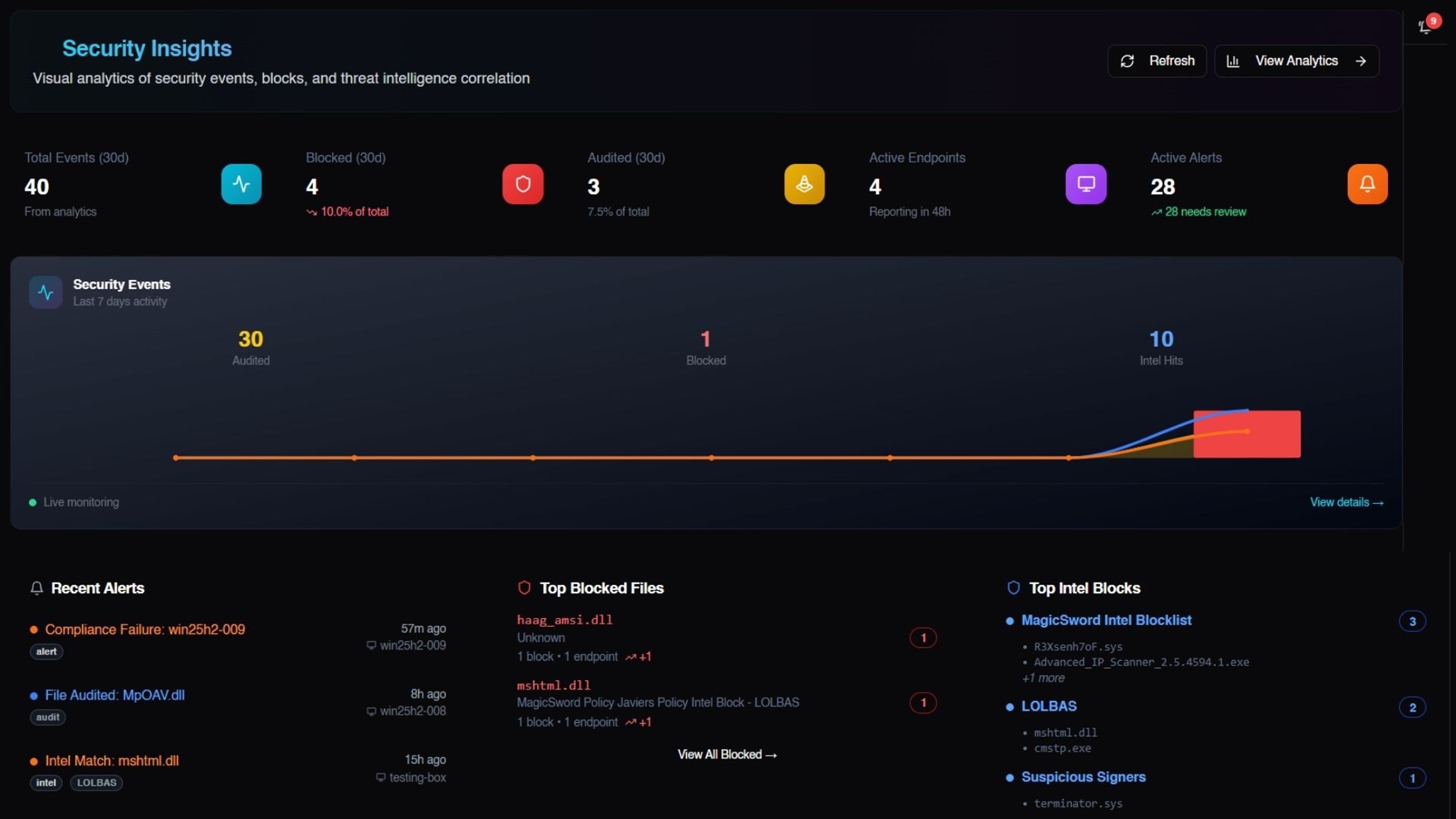
The newest MagicSword portal release brings a series of updates focused on clarity, speed, and meaningful signal. Instead of adding more buttons or dashboards, we improved the parts teams rely on every day: visibility, detection logic, notifications, and policy creation. Here’s what’s new and why it matters.
Real-Time Alert Center
A dedicated security operations dashboard for monitoring threats across your entire fleet.
What you can do:
- View all security events in one place - blocked files, policy violations, threat matches
- Filter by severity (Critical, High, Medium, Low) with one click
- Acknowledge alerts to track team response
- Dismiss resolved alerts to keep focus on active threats
- Search alerts by file name, endpoint, or description
- Click any alert to see full details including file path, hash, matched intel source, and policy

Multi-Channel Alert Delivery
Send security alerts to your existing tools, no new dashboards to monitor.
Supported integrations:
- Slack - Rich formatted messages to any channel via webhook
- Email - Send to distribution lists or ticketing systems via SMTP
- Webhook - POST alerts to any HTTP endpoint (Splunk, ServiceNow, custom apps)
- Syslog - CEF-formatted events over UDP, or TCP to your SIEM
Features:
- Test connection before saving
- Customizable message templates with variables (severity, endpoint, file path, hash, etc.)
- Enable/disable per integration

In-App Notification Center
Stay informed without leaving the portal.
Notification types:
- Security Summaries - "5 new alerts detected on your endpoints"
- Endpoint Health - Compliance failures, Deployer’s going offline
- Intel Updates - New threat intel added to your attached sources
- Portal Announcements - New features, maintenance windows

Guided Policy Creation Wizard
Create policies in minutes with AI-powered recommendations.
Policy profiles for common scenarios:
- Standard Workstation - Balanced protection for business users
- Developer Machine - Allows build tools (MSBuild, compilers) while blocking threats
- IT Admin Workstation - Permits admin tools like PsExec, PowerShell remoting
- Kiosk/Shared Device - Strict lockdown for public-facing machines
- Server - Tailored for Windows Server workloads
What the wizard does:
- Recommends intel sources based on your use case (LOLBAS, LOLDrivers, malware hashes)
- Pre-configures rules appropriate for the profile
- Adds exceptions automatically (e.g., developers need MSBuild)
- Explains why each recommendation matters


Automatic AI Risk Assessment
Every file in your analytics gets enriched with threat intelligence - automatically.
What you see for each entry:
- Risk Level - Critical, High, Medium, Low, or Safe
- Risk Reason - Why the file was flagged (e.g., "Known living-off-the-land binary used for credential theft")
- Common Use - Legitimate purpose of the file
- Typical Locations - Where this file normally lives on Windows
- Recommendation - Allow, Block, or Audit

17 Detection Rules (Correlation Engine)
Pre-built detection logic that automatically creates alerts from your analytics data.
Detection categories:

Per-rule controls:
- Enable/disable for your organization
- Set cooldown period (e.g., only alert once per hour for repeated events)
- Search and filter by MITRE TTPs or other relevant tags
Refreshed Dashboard
Our new dashboard gives you a unified view of what’s happening across your environment the moment you log in. Key metrics like intel hits, top blocked files, audited events, active alerts, and most active endpoints are now surfaced in one place.
Quick links take you straight into deeper analytics or recent activity, making it easier to move from visibility to action.

Want to keep up with how modern attacks actually work? Subscribe to the MagicSword newsletter for practical research, real-world attack tradecraft, and prevention-focused intelligence from the team tracking abused tools every day.
If you want to see how this intelligence turns into real blocking, stopping abused tools before they execute, you can book a demo here.

Written by
Jose Hernandez
Threat Researcher
Jose Enrique Hernandez formed and served as the Director of Threat Research at Splunk. Jose is known for creating several security-related projects, including: Splunk Attack Range, Splunk Security Content, Git-Wild-Hunt, Melting-Cobalt, lolrmm.io and loldrivers.io. He also works as a maintainer to security industry critical repositories such as Atomic Red Team and lolbas-project.github.io.


