CLM Forge: From Script Chaos to Enforced Trust
WDAC Script Enforcement and PowerShell Constrained Language Mode are some of the most powerful native controls Windows ships with and most teams never use them. CLM Forge is the open-source toolkit that turns a multi-year stall into a workflow your team can run this week.
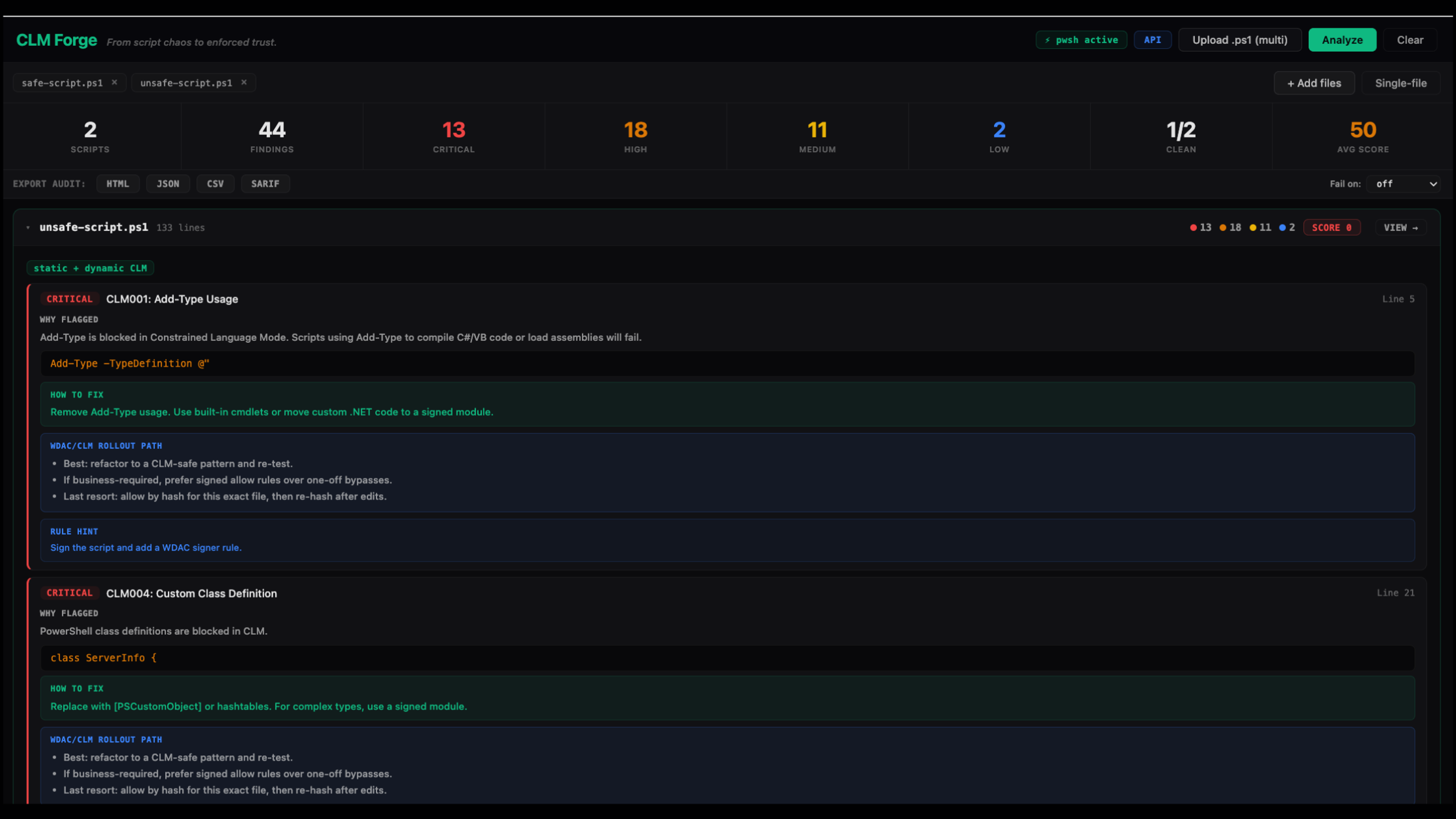
Constrained Language Mode and WDAC Script Enforcement... because not every script needs to run.
Today we're releasing CLM Forge - an open-source readiness toolkit that turns the messy, multi-year journey to WDAC Script Enforcement and PowerShell Constrained Language Mode (CLM) into a workflow your team can actually run on a Tuesday.
Pick a script. Pick a fleet. Pick a thousand. CLM Forge answers one question with confidence:
"If we flip the switch on script enforcement tomorrow, what breaks - and how do we fix it without giving up?"
Not "we'll find out in production." Not "open a ticket and we'll triage." Now.

Why script enforcement is the prevention conversation nobody finishes
Every prevention engineer we talk to has the same WDAC story.
It starts with a security leader reading a vendor blog or an MDE configuration guide and saying "we should turn on script enforcement." It ends, six months later, with the same engineer quietly rolling the policy back to Audit because Finance's nightly close script broke, the helpdesk team's onboarding automation broke, and the AD team's Get-LapsPassword wrapper broke - and nobody knew until 6 a.m.
The Red Canary team has been documenting this gap for years - their long-running coverage of Constrained Language Mode bypasses and behavior is required reading, because it makes one thing brutally clear: adversaries already know exactly what CLM blocks and what slips through. Defenders usually don't.
Constrained Language Mode is one of the most powerful native controls Windows ships with. It strips PowerShell down to a runtime that adversaries genuinely struggle with - no Add-Type, no [Reflection.Assembly]::Load(...), no classes, no COM objects outside the approved list, no Invoke-Expression shenanigans against arbitrary .NET. Pair it with WDAC Script Enforcement and you've eliminated entire ATT&CK sub-techniques in one move:
- T1059.001 (PowerShell) - the malicious half of it
- T1027 (Obfuscated Files or Information) - most loader patterns
- T1055.001 (Reflective DLL Injection) - gone
- T1140 (Deobfuscate/Decode Files or Information) - drastically curtailed
- T1218.005 (Mshta) - only signed/allowed paths
The tradecraft adversaries lean on for living-off-the-land PowerShell - Empire-style stagers, AMSI patches, sliver/cobalt loaders, custom .NET tradecraft - overwhelmingly does not survive contact with a properly enforced WDAC script policy.
The catch: getting to "properly enforced" is where teams stall. The unknowns are the killer.
When a team starts a script-enforcement rollout, the unknowns stack fast:
- What scripts do we even have? SCCM packages, scheduled tasks, GPO logon scripts, ConfigMgr discovery, helpdesk runbooks, vendor installer wrappers, the random
\\fileserver\scripts\share Bob made in 2014. - Which scripts will break under CLM? Not all of them. Maybe not most. But the ones that do break -
Add-Type, classes,using assembly, raw .NET,Invoke-Expression- are exactly the ones that breaking quietly is going to ruin somebody's week. - What do we do about the breakage? Refactor? Sign? Allow by hash? Allow by path? Each option has a different cost, a different blast radius, and a different "how fragile is this in 6 months" curve.
- How do we know we didn't regress? A vendor pushes a script update. A new admin checks in a fresh runbook. WDAC behavior is silent until it isn't.
CLM Forge is built to collapse those unknowns into a workflow:
Upload -> Analyze -> Fix or Allow -> Re-test -> Export evidence
Five verbs. Two ways to run it (web UI for triage, PowerShell module for on-host depth). One mission: get your fleet from "we should do this" to "this is enforced and we have receipts."


A new shorthand for prevention engineers: MTTE
CLM Forge introduces a new metric:
MTTE - Mean Time To Enforcement.
How quickly can your fleet move from "scripts run unrestricted" to "scripts run only when WDAC trusts them"?
Today, for most enterprises, MTTE is measured in quarters - and a lot of orgs never finish. We think it should be measured in weeks, and CLM Forge is the harness that gets you there:
- A static analyzer that flags every CLM-incompatible construct in your script estate, with the rule, the line, and the WDAC rollout option.
- A dynamic constrained runspace test that actually executes scripts under CLM and shows you what happens.
- A WDAC trust verdict from the same WinAPI PowerShell calls internally (WldpCanExecuteFile) so you know what real policy says about a real file.
- WDAC SHA256 hashes ready to drop into a signer/hash allow rule when a refactor isn't possible.
- Batch portfolio scoring + CI fail thresholds so this becomes a gate, not a Friday afternoon project.

What's in the box
CLM Forge ships as two engines that share the same 30-rule analyzer brain, so a finding in the web UI looks the same as a finding from the PowerShell module on a Windows host:
| Component | Run it on | What it does |
|---|---|---|
| Web UI + API (web/) | Anywhere Docker runs | Fast triage, batch portfolio analysis, CI exports (HTML/JSON/CSV/SARIF), WDAC hash output, dynamic runspace tests when pwsh is available |
| PowerShell Module (CLM-Forge/) | Windows hosts (PS 5.1+ / PS 7+) | On-box WldpCanExecuteFile trust checks, WDAC/AppLocker/HVCI/UMCI policy introspection, COM/type host probes, event log analysis, console + HTML + JSON reporting |
Behind both: 30 rules spanning the constructs CLM actually blocks. Every rule includes:
- Why it's flagged - the CLM behavior that triggers the block
- How to fix it - the CLM-safe alternative (cmdlet swap, refactor, structure change)
- WDAC rollout path - explicit guidance: refactor, sign + signer rule, or hash allow as a last resort
A taste of what gets caught:
| Rule | Severity | What it catches |
|---|---|---|
| CLM001 | Critical | Add-Type - the #1 thing CLM kills |
| CLM004 | Critical | PowerShell class definitions |
| CLM005 | Critical | using assembly statements |
| CLM007 | Critical | PowerShell v2 engine downgrade attempts |
| CLM003 | High | Direct [System.IO.File]::*, [Reflection.Assembly]::*, [Marshal]::*, etc. |
| CLM006 | High | Invoke-Expression / iex |
| CLM002 | High | New-Object -ComObject for non-approved classes |
| ...and 23 more | full obfuscation, base64-encoded payloads, AMSI-bypass patterns, and CLM-specific .NET reflection paths |
Every finding is paired with a per-script score:
score = max(0, 100 - (15*Critical + 8*High + 3*Medium + 1*Low))
It's intentionally punitive. A score of 0 means "you have a real problem here." A score of 100 means "this script is ready for CLM today." Everything in between is a rollout-prioritization signal.

60 seconds from clone to first verdict
Spin up the platform
git clone https://github.com/magicsword-io/CLM-Forge
cd CLM-Forge/web
docker compose up --build -d
open http://localhost:8080
That's it. FastAPI backend, full UI, 30-rule analyzer wired up, dynamic runspace tests live if pwsh is on the container.
Or pull from GHCR:
docker pull ghcr.io/magicsword-io/clm-forge:latest
docker run -p 8080:8080 ghcr.io/magicsword-io/clm-forge:latest
Triage a single script
Drop a .ps1 into the upload box. You'll get back, in under a second:
- A verdict (FullLanguage compatible, CLM-incompatible, or borderline)
- Per-finding context: rule, severity, why flagged, how to fix, WDAC rollout option
- A WDAC SHA256 hash ready to paste into a signer/hash policy
- Dynamic execution result if
pwsh is available - what actually happens when this script runs in a constrained runspace

Triage your whole script estate
Same UI, batch upload mode. Drop a folder. Get back a portfolio view: scripts ranked by risk, severity histogram, and a CI-friendly fail threshold so you can wire this into a pipeline.
# Or via the API
curl -X POST http://localhost:8080/api/analyze-batch-upload \
-F "files=@./scripts/" \
-H "Accept: application/json"
Run it on a Windows host with the PowerShell module
Import-Module .\CLM-Forge\CLM-Forge.psd1
# Branded entry point (alias: clmforge)
Invoke-CLMForge -ScriptPath .\Deploy.ps1 -OutputFormat All
# Ask WDAC directly: will this script run trusted?
Test-ScriptWDACTrust -ScriptPath .\Deploy.ps1
The module calls WldpCanExecuteFile via P/Invoke - the same Windows API PowerShell uses internally - and returns one of three verdicts per file:
Allowed(Raw=1) - WDAC trusts it, runs in FullLanguageConstrainedLanguage(Raw=2) - WDAC permits it, but only in CLMBlocked(Raw=0) - WDAC denies execution
Three tiers of detection mean it works whether you're already in FullLanguage (P/Invoke), already constrained (reflection probes), or just want a registry+CIM read (always-on fallback). On Windows hosts with no WDAC policy, you get a clean no policy answer instead of a false negative.
Export the evidence
Every analysis produces exportable artifacts your governance and auditing teams can actually file:
curl -X POST http://localhost:8080/api/export/sarif # SARIF 2.1.0 for CodeQL/GitHub
curl -X POST http://localhost:8080/api/export/csv # Flat finding export
curl -X POST http://localhost:8080/api/report/html # Single-script HTML
curl -X POST http://localhost:8080/api/report/html-batch # Portfolio HTML
A sane rollout playbook
CLM Forge is opinionated about how to actually finish a script-enforcement project, because we've watched too many of them stall:
- Inventory. Run a batch analysis across every script source you've got. Don't filter. You want the messy true picture.
- Sort by score. Worst scripts first. Critical findings are usually one or two patterns repeated everywhere - fix those once and your portfolio score jumps.
- Refactor where it's cheap.
Add-Typefor one helper function? Replace it.Invoke-Expressionover a hashtable? Use the call operator. CLM Forge'sHow to fixline tells you the swap. - Sign what you keep. If a script must do CLM-incompatible things and you control the source, signing + a WDAC signer rule is the durable answer.
- Hash-allow as last resort. CLM Forge gives you the SHA-256 in a copy-paste ready format. Use it sparingly - every edit invalidates the hash.
- Gate it in CI. Wire
/api/analyze-batchinto your pipeline. Set afail_onthreshold (Critical, High,or a numeric score floor). New scripts can't merge until they're CLM-clean. - Re-test continuously.

A note for the prevention engineer reading this
You already know your stack has gaps. You already know the Add-Type script in the AD team's runbook is going to bite. You already know your AppLocker policy hasn't been audited since 2022.
CLM Forge is the toolkit we wish we'd had when we were in your seat. It's free, it's open source, it ships under MagicSword.io, and it's built to make the conversation with your CISO a lot shorter than it usually is:
Q: "Are we ready for WDAC Script Enforcement?"
A: "Here's the portfolio report. We're at 73 on average, 11 scripts below 30. Top three patterns to fix are X, Y, Z. Three months to enforced."
That's the conversation we want every Windows shop to be able to have. CLM Forge is how you get there.
Want the live walkthrough?
Watch Mike run CLM Forge step by step on Prevention Lab Live.
Register for our lives here, every friday 2:00 PM EST.
Get it
- GitHub: https://github.com/magicsword-io/CLM-Forge
- Container: ghcr.io/magicsword-io/clm-forge:latest
- License: Apache 2.0
git clone https://github.com/magicsword-io/CLM-Forge
cd CLM-Forge/web
docker compose up --build -d
open http://localhost:8080
Or on a Windows host:
Import-Module .\CLM-Forge\CLM-Forge.psd1 -Force
Invoke-CLMForge -ScriptPath .\YourScript.ps1
CLM Forge is part of the MagicSword ecosystem. Brought to you by the team that thinks prevention engineering is a discipline, not a project, and that script enforcement is where most Windows fleets find their next 10x.
Want to see prevention in action?
Sign up free - Free up to 100 endpoints
Book a demo - Try Enterprise free for 14 days

Written by
Michael Haag
Threat Researcher
In the intricate chessboard of cybersecurity, my role oscillates between a master tactician and a relentless hunter. As an expert in detection engineering and threat hunting, I don't just respond to the digital threats, I anticipate them, ensuring that the digital realm remains sovereign.


