Application Control
Migrating from AppLocker
Why AppLocker should stop being your application control foundation.
AppLocker still has one useful job: user and group scoped restrictions on shared Windows devices. But as the primary enforcement layer, it is missing too much. MagicSword loads AppLocker XML, inspects the risk, converts supported rules, fixes dangerous defaults, and starts the result in audit mode so teams can migrate without WDAC experts, months of manual XML work, or breaking endpoints just to leave the legacy foundation behind.
AppLocker does not enforce drivers, does not get new feature improvements, does not provide modern App Control capabilities, and does not come with threat intelligence. MagicSword helps you keep the policy intent that matters and move to App Control for Business with inspection, conversion, continuous intelligence, and the operating platform around it.
Microsoft Guidance
Microsoft Learn says App Control for Business was designed as a security feature, AppLocker does not meet the servicing criteria for being a security feature, and customers who can use App Control instead of AppLocker generally should do so. AppLocker remains useful where different users or groups need different policies on shared computers.
Side By Side
AppLocker, App Control, and MagicSword
| Capability | AppLocker | App Control for Business | MagicSword |
|---|---|---|---|
| Microsoft direction | No new features Microsoft says AppLocker receives security fixes but isn't getting new feature improvements. | Forward path Microsoft says customers who can implement App Control instead of AppLocker generally should. | Built on the forward path MagicSword runs on App Control for Business and adds migration, operations, and intelligence. |
| Security feature classification | Not classified Microsoft says AppLocker doesn't meet the servicing criteria for being a security feature. | Security feature App Control was designed as a Microsoft security feature under MSRC servicing criteria. | Security feature foundation MagicSword uses the App Control enforcement layer rather than trying to extend AppLocker. |
| Enforcement layer | User mode AppLocker relies on the Application Identity service and user-mode policy enforcement. | Kernel mode App Control uses Code Integrity to control applications and drivers before execution. | Kernel mode plus operations MagicSword adds policy workflow, audit history, rollout support, and tuning on top. |
| Driver enforcement | No AppLocker does not enforce driver files. | Yes App Control can enforce driver files and kernel mode policy. | Yes, with driver intel MagicSword layers vulnerable driver and EDR killer intelligence into Windows policies. |
| Per-user and group rules | Yes This is the real reason to keep AppLocker for some shared-device cases. | No App Control policies are device-wide. | Endpoint and group targeting Deploy policies to single endpoints or groups, then clone and tune policy exceptions for a specific endpoint when needed. |
| Managed installer | No Managed Installer is not an AppLocker feature. | Yes App Control can trust apps deployed by an authorized software distribution system. | Yes MagicSword keeps the modern App Control deployment model in the policy workflow. |
| Reputation-based intelligence | No AppLocker has no reputation-based intelligence path. | Yes App Control can use Microsoft Intelligent Security Graph reputation. | Yes, plus curated intel MagicSword adds curated sources for LOLBAS, LOLDrivers, LOLRMM, abused signers, malware hashes, and more. |
| Multiple policy support | No AppLocker does not support the modern multiple-policy model. | Yes App Control supports multiple policies on modern Windows releases. | Yes MagicSword authors, organizes, and deploys policy sets through the console. |
| Allowlist and blocklist modes | Rule collections AppLocker can allow or deny by rule collection, but it is still the legacy AppLocker model. | Native engine App Control can support strict application control, but policy design and rollout are on your team. | Built in Run deny-by-default allowlist policies where you are ready and threat-driven blocklist policies where you need speed. |
| COM object and AppId controls | No COM object allowlisting and AppId tagging are not AppLocker capabilities. | Yes App Control adds newer controls AppLocker never received. | Yes MagicSword keeps teams on the App Control feature set as Microsoft expands it. |
| Threat intelligence built in | No Your team writes and maintains every AppLocker rule. | Native engine App Control provides the engine and ISG reputation, not a complete curated blocklist program. | Yes Recommended Windows sources attach LOLBAS, LOLDrivers, LOLRMM, EDR killers, malware hashes, exploited signers, and more. |
| AppLocker audit and scoring | No AppLocker does not score your policy or explain migration risk. | No Native App Control does not inspect AppLocker XML and produce a migration report. | Yes Policy Inspector gives a security score, severity-ranked issue list, and PDF report. |
| AppLocker to App Control conversion | Not applicable AppLocker is the source policy, not the migration destination. | Manual You own conversion, cleanup, testing, XML, deployment, and rule maintenance. | Yes MagicSword converts supported rules, disables dangerous defaults, fixes paths, removes duplicates, and starts in audit mode. |
| Audit-first rollout | Manual You can configure audit modes, but the migration workflow is on your team. | Manual Native App Control is powerful, but rollout safety depends on your process. | Default Converted policies start in audit mode so events can close gaps before enforcement. |
What Is Missing
Why AppLocker Should Be Retired As The Baseline
This is not about blaming teams for using what Windows gave them years ago. It is about recognizing that the Windows application control model has moved forward and AppLocker did not move with it.
AppLocker is not the security feature Microsoft is investing in
Microsoft's own guidance says App Control should generally be used when customers can implement it, while AppLocker continues receiving fixes but no new feature improvements.
It misses modern control points
Kernel mode policies, driver enforcement, Managed Installer, multiple policies, reputation-based intelligence, COM object allowlisting, AppId tagging, and newer signer controls all live on the App Control side.
It has no threat intelligence operating model
AppLocker rules do not know about LOLBAS, LOLDrivers, LOLRMM, abused code-signing certificates, EDR killers, or malware signing abuse unless your team manually writes and maintains that coverage.
Old policies quietly rot
The risk is rarely one bad rule. It is years of broad defaults, stale exceptions, user-writable paths, network shares, hardcoded drives, and wildcard publishers that nobody wants to touch.
Policy Inspector
What MagicSword Looks For In AppLocker XML
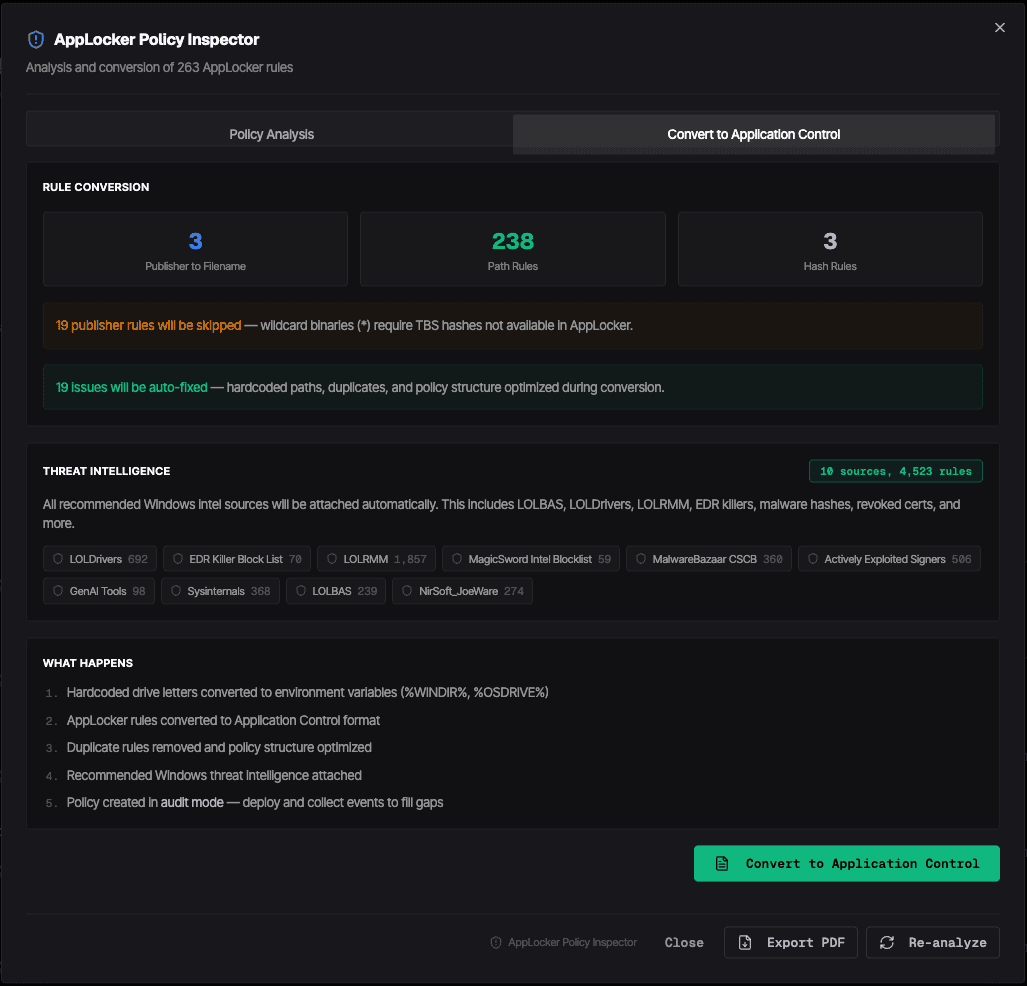
The first step is not conversion. The first step is showing what the policy actually allows. MagicSword analyzes the AppLocker XML before creating an App Control policy so teams can see the risk, not just the rule count.
Common Findings
- →Dangerous default rules such as *, *.*, C:\*, %PROGRAMFILES%\*, %WINDIR%\*, and root-drive wildcards
- →User-writable allow paths such as AppData, Temp, Downloads, and broad profile wildcards
- →UNC and network path rules that trust shared locations attackers can abuse or hijack
- →Publisher rules with wildcard binaries that AppLocker cannot carry into App Control without TBS hashes
- →Hardcoded paths such as C:\Windows and C:\Windows\System32 that need WDAC macros
- →Duplicate, overlapping, invalid, or high-maintenance rule structures
- →Collections left not configured, audit-only, or inconsistent across file types
Why MagicSword
The AppLocker Migration Should Be An Operating Workflow
Native App Control gives you the enforcement engine. MagicSword gives you the migration and operating layer around it: inspect, convert, fix, enrich, and roll out without guessing.
Inspect
Know what the AppLocker policy is really doing
Policy Inspector scores the policy, ranks high and medium findings, shows affected rules, and produces a PDF for security and leadership review.
Convert
Move rule intent into App Control
MagicSword converts path and hash rules, converts specific publisher binaries where possible, skips unsafe wildcard publisher rules, and preserves notes for manual review.
Fix
Clean up the dangerous parts
Hardcoded drive letters are normalized, dangerous defaults are disabled, duplicates are removed, and risky wildcard or user-writable rules are called out before rollout.
Enrich
Attach intelligence AppLocker never had
Recommended Windows sources add coverage for living-off-the-land binaries, vulnerable drivers, RMM abuse, EDR killers, malware hashes, revoked certs, and exploited signers.
Operate
Start in audit mode, then enforce
Converted policies ship listening first. Teams collect events, tune misses, close gaps, and promote to enforcement when the evidence supports it.
Beyond Conversion
MagicSword Is More Than A WDAC Migration Tool
AppLocker migration is the starting point. The larger reason to work with MagicSword is that policy, deployment, tuning, telemetry, intelligence, and enforcement all stay connected after the conversion is done.
Policy deployment by endpoint or group
Assign policies to individual endpoints or endpoint groups. When one machine needs a tuned exception, clone the policy, adjust it, and deploy the variant only where it belongs.
Allowlist and blocklist operating modes
Use deny-by-default allowlist mode for high-control Windows environments and blocklist mode for fast threat-driven coverage. Mix modes by environment, rollout stage, or risk tolerance.
Browser extension enforcement
Collect extension inventory and enforce Chrome, Edge, Firefox, and Safari controls by policy. Allow extensions, block extensions, or block broadly with approved extension exceptions.
MagicSword AMSI
Enable the MagicSword AMSI provider with 238 built-in detection rules plus custom rules. Start in audit mode, tune severity thresholds, defer to Microsoft Defender, and inspect detections in Analytics.
Zero Trust Execution zones
Define trusted and untrusted execution zones across Windows, macOS, and Linux. Allow protected system paths, deny temp folders, downloads, persistence paths, world-writable locations, and other risky zones.
macOS and Linux spawn control
Use 70+ spawn control templates for macOS and Linux parent-child abuse, including browsers launching shells, Office or iWork spawning scripts, osascript chains, GTFOBins, LOOBins, temp execution, persistence, credential access, web server abuse, and shell download-execute patterns.
Threat intelligence that keeps moving
Attach 17+ intelligence sources updated every two hours: LOLBAS, LOLDrivers, LOLRMM, EDR killers, abused signers, revoked certificates, malware hashes, macOS and Linux abuse catalogs, and more.
Endpoint visibility for policy decisions
Use process trees, parent process context, command-line samples, software inventory, driver inventory, Store app inventory, browser extension inventory, and File Explorer telemetry to tune policy with evidence.
Which Path Should You Take?
Stay on AppLocker
Reasonable only for narrow shared-device cases where per-user or per-group rules are the main requirement.
Run native App Control yourself
Good for teams ready to own XML, policy testing, deployment channels, refresh cadence, and their own intelligence program.
Run MagicSword on App Control
Best when you want the Microsoft enforcement layer with migration tooling, policy operations, audit-first rollout, and continuously updated threat intelligence.
The goal is not a blind rip and replace. The goal is to stop treating AppLocker as the foundation, preserve useful intent, and move execution control to the layer Microsoft is actively improving.
FAQ
Frequently Asked Questions
Should organizations abandon AppLocker?
As the primary application control foundation, yes, if they can move to App Control for Business. AppLocker can still be useful as a complement for shared-device cases that require user or group scoped rules.
Why use MagicSword instead of native App Control alone?
Native App Control gives you the enforcement engine. MagicSword adds AppLocker inspection, conversion, cleanup, threat intelligence, policy operations, endpoint and group deployment, endpoint visibility, browser extension enforcement, AMSI, Zero Trust Execution, audit history, and audit-first rollout support.
Can MagicSword convert every AppLocker rule automatically?
No converter should blindly convert every rule. MagicSword converts supported rules, flags or skips unsafe rules that need missing AppLocker context such as TBS hashes, disables dangerous defaults, and records conversion notes for review.
Is MagicSword only an AppLocker and WDAC migration tool?
No. Migration is one workflow. MagicSword also provides allowlist and blocklist policy modes, threat intelligence updates, browser extension controls, AMSI detections, Zero Trust Execution zones, process telemetry, software and driver inventory, Store app inventory, File Explorer visibility, and policy deployment to endpoints or groups.
Deep Dives
Read More On The Platform Pieces
AppLocker migration touches more than one control. These pages go deeper on the operating models, deployment choices, visibility, and intelligence that make MagicSword a platform for application control.
Allowlisting vs Blocklisting
How deny-by-default and threat-driven blocklists work together.
Agent vs Agentless
When to use agentless App Control deployment and when the full agent matters.
Threat Intelligence
The abuse catalogs and intelligence sources that keep policy current.
Threat-Driven Application Control
How MagicSword turns attacker behavior into practical enforcement.
Endpoint Visibility
The process, command-line, software, driver, and inventory data behind tuning.
Application Control + EDR
How application control reduces what EDR has to chase after execution.
See What Your AppLocker Policy Is Really Doing
Upload your AppLocker XML, inspect the risk, and migrate to App Control with MagicSword conversion, cleanup, and threat intelligence.